Axler-AI
An AI-supported, self-paced tutor for Algebra and Trigonometry
What it is
A tutor a student can actually explore with.
Axler-AI walks a student through Sheldon Axler's textbook one lesson at a time. Each lesson runs them through five phases — read, watch, play, practice, and extend — with a deterministic math checker validating their algebra and a warm Socratic AI tutor on hand to ask the right next question.
The aim is the opposite of a worksheet: instead of waiting to be taught, a student opens the app and works at their own pace. When they get stuck, they ask. When they get something right, the tutor stretches them with a deeper follow-up. When they want to chase a tangent — "what happens if the angle is negative?" — they can.
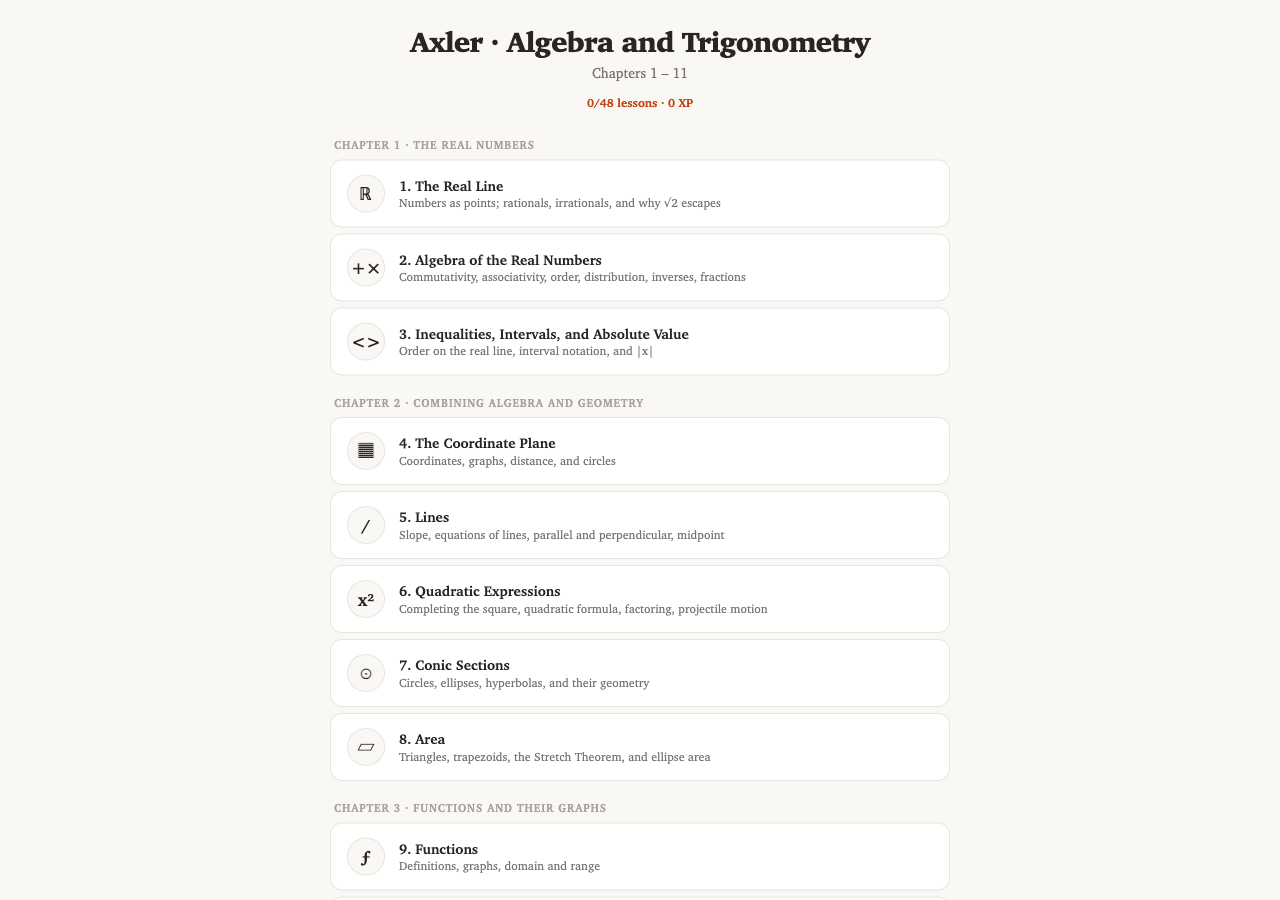
The lesson map — 48 lessons across 11 chapters, each with its own icon and brief subtitle.
How a lesson works
Five phases per lesson.
Every lesson follows the same rhythm. The student is never far from doing the math themselves.
Why this matters. A traditional class moves at the pace of the median student. A motivated student can finish a lesson in 20 minutes; a struggling student can stay on Read and Watch as long as they need. Same content, same rigor, very different pace — for both.
Under the hood
Two engines, working together.
The hard problem in an AI tutor is that language models are not reliable at arithmetic or algebra. They will affirm an answer that's almost right and confidently explain a calculation that isn't quite correct. So Axler-AI splits the work in two:
1. A deterministic math verifier
The student's algebra is checked by a symbolic math engine (SymPy, running directly in the browser). It returns a yes-or-no on whether the equation is true — never a guess.
2. A Socratic AI tutor
The tutor (powered by Claude) handles all of the language: echoing back what it sees, asking the right Socratic question, deciding when to give a hint. It is told the verifier's verdict, so it never affirms math the verifier rejected.
flowchart LR
  classDef student fill:#fef3c7,stroke:#b45309,color:#78350f,font-weight:600;
  classDef verify  fill:#dcfce7,stroke:#15803d,color:#14532d,font-weight:600;
  classDef ai      fill:#dbeafe,stroke:#1d4ed8,color:#1e3a8a,font-weight:600;
  classDef out     fill:#fff,stroke:#9a8c7e,color:#1a1410;

  S["Student writes
an equation"]:::student
  V["Symbolic math
verifier (SymPy)"]:::verify
  A["Claude tutor
(language + pedagogy)"]:::ai
  R["Tutor reply
echoes what it read +
asks one Socratic question"]:::out

  S --> V
  V -- "true / false / unknown" --> A
  S -- "raw text + drawing" --> A
  A --> R
Every math claim the student makes is checked by the symbolic engine first. The AI tutor never gets to override the verifier's verdict — it just handles the wording.
The architecture
How the pieces fit.
The full stack is a React web app with the curriculum content held in one structured file, a library of ~125 interactive figures built on a shared 2D / 3D plotting primitive, and the two-engine tutor described above. There is no backend database — progress and conversation history live in the browser.
flowchart TB
  classDef ui     fill:#fef3c7,stroke:#b45309,color:#78350f;
  classDef fig    fill:#dbeafe,stroke:#1d4ed8,color:#1e3a8a;
  classDef math   fill:#dcfce7,stroke:#15803d,color:#14532d;
  classDef data   fill:#e9d5ff,stroke:#7e22ce,color:#581c87;

  subgraph UI["What the student sees"]
    APP["App · Lesson screen"]:::ui
    PHASES["Read · Watch · Play
Practice · Extend"]:::ui
  end

  subgraph FIG["Interactive figures (~125)"]
    PLOT["Shared 2D & 3D
plotting primitives"]:::fig
    FIGS["Lesson-specific figures
(drag points along curves)"]:::fig
  end

  subgraph BRAIN["The two engines"]
    SYMPY["Symbolic math verifier
(SymPy in the browser)"]:::math
    CLAUDE["Claude tutor API
(language + pedagogy)"]:::math
  end

  subgraph DATA["Content"]
    LES["Curriculum
48 lessons, 441 problems"]:::data
  end

  APP --> PHASES
  PHASES --> FIGS
  PHASES --> SYMPY
  PHASES --> CLAUDE
  PHASES --> LES
  FIGS --> PLOT
  SYMPY --> CLAUDE
What's been built
The numbers.
48 lessons, 11 chapters
From the real number line through complex numbers in the plane — the full Axler textbook.
441 Extend problems
9 per lesson, sorted into computational / conceptual / investigation tiers with staged hints.
~125 interactive figures
All built on a shared primitive layer. Many let the student drag points along the curve and see live updates.
327 storybook tests, 6 verifier tests
A test suite that catches both visual regressions in the figures and contract drift in the math verifier.
In-app cross-references
Concepts mentioned in a lesson link to the lesson that introduced them, with a "back" stack so students never get lost.
Sketch-on-the-page input
Students can answer in handwriting on a built-in drawing pad. The tutor reads the handwriting.
How it gets built
The lessons aren't hand-written. They're shipped by an agentic loop.
Every lesson goes through the same production pipeline. An AI coding agent (Claude, running in a development harness) follows a tight standing-plan loop: read the textbook section, branch, write the lesson content + interactive figures, run the test suite, walk the lesson by hand in the browser, open a PR, squash-merge. Then the next lesson starts.
Two safety nets sit on top of the per-lesson loop. At the end of every chapter, a separate UI auditor agent walks all the merged figures looking for visual regressions and ships a follow-up PR with the fixes. On demand, a multi-agent code review can be triggered against any branch — several independent reviewers each read the diff and surface issues.
flowchart TB
  classDef loop   fill:#dbeafe,stroke:#1d4ed8,color:#1e3a8a;
  classDef audit  fill:#fee2e2,stroke:#b91c1c,color:#7f1d1d;
  classDef gate   fill:#e9d5ff,stroke:#7e22ce,color:#581c87;
  classDef out    fill:#dcfce7,stroke:#15803d,color:#14532d;

  subgraph PerLesson["Per-lesson loop · the standing plan"]
    direction TB
    A1["Read textbook section"]:::loop
    A2["Branch · author lesson + figures"]:::loop
    A3["Run tests · vitest + storybook"]:::loop
    A4["Manual UI walk"]:::loop
    A5["Open PR · squash-merge"]:::loop
    A1 --> A2 --> A3 --> A4 --> A5
    A5 -.next lesson.-> A1
  end

  subgraph Finale["Chapter finale → UI auditor"]
    direction TB
    F1["Final lesson in chapter merges"]:::audit
    F2["UI auditor subagent walks chapter"]:::audit
    F3{"≤ 10 issues?"}:::gate
    F4["Auditor ships fix PR"]:::out
    F5["Escalate to human"]:::audit
    F1 --> F2 --> F3
    F3 -- yes --> F4
    F3 -- no --> F5
  end

  subgraph UltraReview["Multi-agent review · on demand"]
    U1["Several reviewer agents read the diff"]:::audit
    U2["Findings consolidated into one report"]:::out
    U1 --> U2
  end

  PerLesson -.chapter ends.-> Finale
  PerLesson -.any branch.-> UltraReview
The same loop ran 48 times to ship the curriculum. The auditor caught dozens of figure regressions that wouldn't have surfaced from tests alone.
A common question
"If a student draws an equation, does the verifier still run?"
Yes — it's just one step later. The student's drawing first goes through a
vision-language model that transcribes the handwriting into a
machine-parseable form like x^5 * x^7 = x^12. That transcription
is then handed to the symbolic math verifier, which returns a true / false / unknown
verdict. The Socratic tutor only speaks after seeing the verdict.
The one place errors can enter is transcription — a "2" mistaken for an exponent, a square-root sign read as something else. To make those errors catchable, the tutor's reply always opens by echoing what it read: "I see you wrote x⁵ · x⁷ = x¹²..." so the student spots the misread and can correct it. Drawings never go straight to the AI without the verifier in the loop.
flowchart LR
  classDef draw   fill:#fef3c7,stroke:#b45309,color:#78350f;
  classDef vision fill:#fde68a,stroke:#a16207,color:#713f12;
  classDef verify fill:#dcfce7,stroke:#15803d,color:#14532d;
  classDef ai     fill:#dbeafe,stroke:#1d4ed8,color:#1e3a8a;
  classDef out    fill:#fff,stroke:#9a8c7e;

  D["Student draws
an equation"]:::draw
  V1["Vision model
transcribes drawing
to plain text"]:::vision
  V2["Symbolic verifier
checks the equation"]:::verify
  A["Claude tutor
echoes back +
responds Socratically"]:::ai
  R["Reply that names
exactly what was read"]:::out

  D --> V1
  V1 -- "x^5 * x^7 = x^12" --> V2
  V2 -- "true / false / unknown" --> A
  V1 -- "interpretation" --> A
  A --> R
A ten-minute walk-through
How to try it.
Click the Try the live tutor → button at the top — everything runs in the browser, no install needed. The full app loads in a few seconds.
- The first lesson (1. The Real Line) is unlocked. Click it and walk through any phase.
- If you want to skip ahead, scroll to the bottom and tick Teacher mode (unlock all) — every lesson becomes clickable.
- For a quick feel of the AI tutor, jump to a Play or Practice phase and type an answer (correct or wrong — both teach you something different).
- For a feel of the depth, try an Extend problem — ask for a hint, then another, then unlock open chat.
The whole project — source, lesson content, tests — is open. Happy to share the code, the methodology document, or any individual piece in detail.